Older Version
Newer Version
 Alyce
Nov 4, 2006
Alyce
Nov 4, 2006
Lesson Map | Next > Saving
Just so you'll know what to expect, let me show you what you'll get when you run the "Hello, World!" program you wrote in the previous exercise :
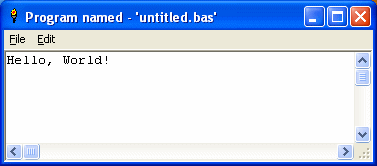
This is the main window , or as we'll call it from now on, a mainwin . And right there at the top of the text area in the mainwin is the famous "Hello, World!" greeting that signifies the entrance of a new member into the Exalted Guild of Computer Programmers .
Now, to make your entrance, run your program by selecting Run > Run from the LB editor's menu, or by clicking on the Run button, the blue button on the editor toolbar.
Pow! There's your mainwin, and your message to the world. Congratulations -- you've written and run your first LB program! When you're done admiring it, press the X button on the top right side of the window to close the mainwin and return to the LB editor.
(Note: If you didn't get the result described above, close everything except this Jumpstart window, and click here to try again. )
Lesson Map | Next > Saving
Running Your First Program
Just so you'll know what to expect, let me show you what you'll get when you run the "Hello, World!" program you wrote in the previous exercise :
This is the main window , or as we'll call it from now on, a mainwin . And right there at the top of the text area in the mainwin is the famous "Hello, World!" greeting that signifies the entrance of a new member into the Exalted Guild of Computer Programmers .
Now, to make your entrance, run your program by selecting Run > Run from the LB editor's menu, or by clicking on the Run button, the blue button on the editor toolbar.
Pow! There's your mainwin, and your message to the world. Congratulations -- you've written and run your first LB program! When you're done admiring it, press the X button on the top right side of the window to close the mainwin and return to the LB editor.
(Note: If you didn't get the result described above, close everything except this Jumpstart window, and click here to try again. )
Lesson Map | Next > Saving