Older Version
Newer Version
 Alyce
Oct 6, 2011
Alyce
Oct 6, 2011
Transferring Bits
- Alyce
Alyce
Bit Transfer | PatBlt | Transferring Bits with BitBlt | ROP | Demo
Some text below is copied from the Microsoft Developers Network Library.
For an eBook or printed book on using the API with Liberty BASIC, see:
APIs for Liberty BASIC
NOTE: The operation performed is determined by the Raster Operation (ROP) argument. Here are the ROP values available:
Use PatBlt to make simple transformations on an area of an image. For instance, using _BLACKNESS causes the specified area to be black, and _DSTINVERT causes the specified area to look like a photographic negative of itself.
BitBlt modifies a rectangle within the destination DC by using bits from within a rectangle on the Source DC. The source and destination DCs can be the same DC, or different DCs. It combines the colors using the ROP specified. Possible ROP values are described below.
BitBlt performs a logical combination of three elements: the BRUSH selected in the Destination DC, the PIXELS from the rectangle defined in the Source DC, and the PIXELs in the Destination DC. The combination of these three elements is used to create the resulting image in the Destination DC. The way these elements are combined is determined by the ROP (Raster OPeration) code. There are 256 different ROP codes that can be used. 15 of these are defined and have a Windows constant name.
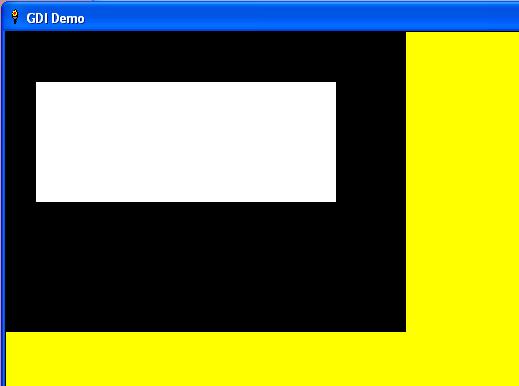
Run the code and you will see this:
GDI Tutorials Home
-
Alyce Bit Transfer | PatBlt | Transferring Bits with BitBlt | ROP | Demo
Some text below is copied from the Microsoft Developers Network Library.
For an eBook or printed book on using the API with Liberty BASIC, see:
APIs for Liberty BASIC
Bit Transfer
We've discussed memory device context and memory bitmaps in previous lessons. We need a way to display the image in memory on the screen. We can do that with one of the bit transfer functions. The bit transfer functions transfer image bits on device contexts. Some bit transfer functions specify a source DC and a destination DC. These can be the same DC or different DCs.PatBlt
PatBlt is the simplest of the bit transfer functions available. It alters the pixels contained within the specified area according to the drawing rule that is designated by the raster operation argument. It works on a single DC. The syntax for the call is:CallDll #gdi32, "PatBlt",_
hdc as ulong,_ 'device context
xDest as long,_ 'x origin for transfer
yDest as long,_ 'y origin for transfer
xWidth as long,_ 'width of area to access
yHeight as long,_'height of area to access
ROP as ulong,_ 'type of transfer
result as boolean
NOTE: The operation performed is determined by the Raster Operation (ROP) argument. Here are the ROP values available:
Use PatBlt to make simple transformations on an area of an image. For instance, using _BLACKNESS causes the specified area to be black, and _DSTINVERT causes the specified area to look like a photographic negative of itself.
Transferring Bits with BitBlt
BitBlt modifies a rectangle within the destination DC by using bits from within a rectangle on the Source DC. The source and destination DCs can be the same DC, or different DCs. It combines the colors using the ROP specified. Possible ROP values are described below.
 CallDll #gdi32, "BitBlt", _
 hDCdest as ulong,_ 'The destination DC
 xDest as long,_ 'x location on destination
 yDest as long,_ 'y location on destination
 xWidth as long,_ 'width to transfer
 yHeight as long,_ 'height to transfer
 hDCsource as ulong,_ 'The source DC
 xSrc as long,_ 'x location in source
 ySrc as long,_ 'y location in source
 ROP as ulong,_ 'The operation to be performed
 result as boolean 'nonzero if successful
BitBlt performs a logical combination of three elements: the BRUSH selected in the Destination DC, the PIXELS from the rectangle defined in the Source DC, and the PIXELs in the Destination DC. The combination of these three elements is used to create the resulting image in the Destination DC. The way these elements are combined is determined by the ROP (Raster OPeration) code. There are 256 different ROP codes that can be used. 15 of these are defined and have a Windows constant name.
ROP
The simplest operation that can be performed is a COPY command. The Liberty BASIC name for this Windows constant is _SRCCOPY. This will simply copy the source to the destination, ignoring the settings of the Brush and the Pixels in the destination DC. Here are the other common commands, and a description of the way they work:Demo
We can now transfer an image in memory to our Liberty BASIC graphicbox.- We fill the graphicbox with yellow with the native FILL command.
- We get a handle to the graphicbox device context.
- We create a memory device context compatible with the graphicbox device context.
- We create a memory bitmap compatible with the graphicbox device context.
- We select the memory bitmap into the memory device context.
- We use PatBlt to draw a white rectangle on the default black memory bitmap.
- We transfer a rectangular area from the memory bitmap to the graphicbox.
Run the code and you will see this:
 nomainwin
 winWide=700:winHigh=500
 WindowWidth=winWide+50:WindowHeight=winHigh+50
 UpperLeftX=1:UpperLeftY=1

 graphicbox #1.g, 0,0,winWide,winHigh
 open "GDI Demo" for window as #1
 #1 "trapclose [quit]"
 #1.g "down;fill yellow;flush"

 h=hwnd(#1.g) 'graphicbox handle

 'get device context for window:
 calldll #user32, "GetDC",_
 h as ulong,_ 'graphicbox handle
 hdc as ulong 'returns handle to device context

 calldll #gdi32, "CreateCompatibleDC",_
 hdc as ulong,_ 'graphicbox DC
 hMemDC as ulong 'memory DC

 nWidth=100 : nHeight=200
 calldll #gdi32, "CreateCompatibleBitmap",_
 hdc AS ulong,_ 'window DC, NOT memory DC
 winWide AS long,_ 'width of created bitmap
 winHigh AS long,_ 'height of created bitmap
 handleBmp AS ulong 'returns handle if successful

 CallDLL #gdi32,"SelectObject",_
 hMemDC as uLong,_ 'memory DC
 handleBmp as uLong,_ 'handle of bmp
 oldBmp as uLong 'returns previously selected bitmap

 'PatBlt to change the memory bitmap
 'when created, memory bitmap is all black
 'place white rectangle on memory bmp
 CallDll #gdi32, "PatBlt",_
 hMemDC as ulong,_ 'memory device context
 30 as long,_ 'x origin for transfer
 50 as long,_ 'y origin for transfer
 300 as long,_ 'width of area to access
 120 as long,_ 'height of area to access
 _WHITENESS as ulong,_ 'make specified area white
 result as boolean

 'transfer a rectangular area of memory bmp to graphicbox
 CallDll #gdi32, "BitBlt", _
 hdc as ulong,_ 'The destination DC = graphicbox
 0 as long,_ 'x location on destination
 0 as long,_ 'y location on destination
 400 as long,_ 'width to transfer
 300 as long,_ 'height to transfer
 hMemDC as ulong,_ 'The source DC = memory
 0 as long,_ 'x location in source
 0 as long,_ 'y location in source
 _SRCCOPY as ulong,_'The operation to be performed
 result as boolean 'nonzero if successful
 wait

 [quit]
 'select default bmp back into DC
 CallDLL #gdi32,"SelectObject",_
 hMemDC as uLong,_ 'memory DC
 oldBmp as uLong,_ 'handle of original, default bmp
 handle as uLong 'returns previously selected bitmap

 CallDLL #gdi32,"DeleteObject",_
 handleBmp as uLong,_ 'handle of bmp
 r As Boolean

 calldll #gdi32, "DeleteDC",_
 hMemDC as ulong,_ 'DC to delete
 re as long 'nonzero=success

 calldll #user32, "ReleaseDC",_
 h as ulong,_ 'window handle
 hdc as ulong,_ 'device context
 ret as long

 close #1:end
GDI Tutorials Home