 JanetTerra
Feb 4, 2007
- "Added [[toc]]"
JanetTerra
Feb 4, 2007
- "Added [[toc]]"
A Graphicbox with Scrollbars
- janetterra
 Horizscrollbar and Vertscrollbar
Liberty BASIC v4 gives us more control of the horizontal and vertical scrollbars of the Graphics window and even a Graphicbox. From the What's New of the Liberty BASIC v4 Help File -
- print #handle "horizscrollbar on/off [min max]"
- This command manages the horizontal scrollbar. If the value is "on", the scrollbar is made visible. If the value is "off", the scrollbar is hidden. When turning on the scrollbar the optional parameters for min and max set the minimum and maximum scrollbar range in pixels (these parameters do nothing when turning the scrollbar off.) Without these parameters the default range is set to 0 and the width of the graphics view in pixels. A large scrollbar range allows the graphics window to scroll a long distance, while a short range allows it to scroll a short distance.
A Graphics Window with Scrollbars
A window opened for Graphics contains scrollbars by default.
Open "A Graphics Window" for Graphics as #1These scrollbars can be removed using the Vertscrollbar off and Horizscrollbar off commands.
#1, "Trapclose EndDemo"
Wait
Sub EndDemo handle$
Close #1
End
End Sub
 Open "A Graphics Window" for Graphics as #1
 #1, "Trapclose EndDemo"
 #1, "Horizscrollbar Off"
 #1, "Vertscrollbar Off"
 Wait

 Sub EndDemo handle$
 Close #1
 End
 End Sub
A Graphicbox with Scrollbars
Normally, a graphicbox opened within another window does not contain scrollbars. Scrollbars can be added with the Vertscrollbar On and Horizscrollbar On commands.
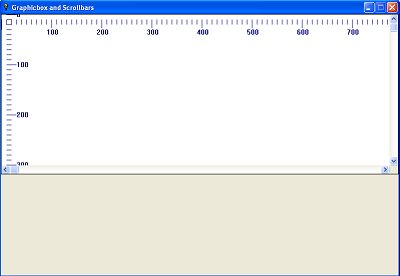
 Nomainwin
 WindowWidth = 800
 WindowHeight = 554

 UpperLeftX = Int((DisplayWidth - WindowWidth)/2)
 UpperLeftY = Int((DisplayHeight - WindowHeight)/2)

 Graphicbox #main.gb, 0, 0, 794, 320
 Open "Graphicbox and Scrollbars" for Window_nf as #main
 #main, "Trapclose EndDemo"
 #main, "Font Verdana 10 Bold"
 #main.gb, "Horizscrollbar On"
 #main.gb, "Vertscrollbar On"
 #main.gb, "Down; Color Darkblue"
 For x = 0 to 1550 Step 10
 #main.gb, "Place ";x;" 10"
 #main.gb, "North; Turn 180; Go 10"
 If x / 100 = Int( x / 100 ) Then
 #main.gb, "Go 10"
 #main.gb, "Place ";x - 10;" 40"
 #main.gb, "\";x
 End If
 Next x
 For y = 0 to 1500 Step 10
 #main.gb, "Place 10 ";y
 #main.gb, "North; Turn 90; Go 10"
 If y / 100 = Int( y / 100 ) Then
 #main.gb, "Go 10"
 #main.gb, "Place 30 ";y + 5
 #main.gb, "\";y
 End If
 Next y
 #main.gb, "Flush"
 Wait

 Sub EndDemo handle$
 Close #main
 End
 End Sub
A Word About the Actual size of the Graphicbox
The defined size of a graphicbox includes the graphicbox borders as well. This means that a 200 x 200 graphicbox can only display a 198 x 198 graphic. The display size is further compromised by the addition of scrollbars. Windows automatically subtracts the width of the scrollbar from the client area, so that painting on the client area does not run over the scrollbars. Increasing the width and height of the graphicbox by 20 pixels each should fully compensate for this loss. A 500 x 500 graphicbox with scrollbars has an approximate 480 x 480 display area.
Setting the Scrollbar min and max Parameters
The Scrollbar commands support optional min and max parameters. By including these limits, the programmer can define the exact area to be scrolled. The min of both width and height is usually zero, but it can be any number, even a negative number. It is important to note that the max is not the actual final limit of the display. Rather, it is the Upper Left value. The size of the graphicbox (both width and height) extends this values. If the max width parameter is set to 500 for a graphicbox that is 400 pixels wide, the actual display area becomes approximately 880 pixels wide (900 pixels minus the scrollbar width). The same is true for the max height parameter.
 Nomainwin
 WindowWidth = 806
 WindowHeight = 554

 UpperLeftX = Int((DisplayWidth - WindowWidth)/2)
 UpperLeftY = Int((DisplayHeight - WindowHeight)/2)

 Graphicbox #main.gb, 0, 0, 800, 320
 Open "Graphicbox and Scrollbars" for Window_nf as #main
 #main, "Trapclose EndDemo"
 #main, "Font Verdana 10 Bold"
 #main.gb, "Vertscrollbar On 0 500"
 #main.gb, "Horizscrollbar On 0 1000"
 #main.gb, "Down; Color Darkblue"
 For x = 0 to 1780 Step 10 '1000 (max) + 800 (graphicbox width) - 20 = 1780
 #main.gb, "Place ";x;" 10"
 #main.gb, "North; Turn 180; Go 10"
 If x / 100 = Int( x / 100 ) Then
 #main.gb, "Go 10"
 #main.gb, "Place ";x - 10;" 40"
 #main.gb, "\";x
 End If
 Next x
 For y = 0 to 800 Step 10 '500 (max) + 320 (graphicbox height) - 20 = 800
 #main.gb, "Place 10 ";y
 #main.gb, "North; Turn 90; Go 10"
 If y / 100 = Int( y / 100 ) Then
 #main.gb, "Go 10"
 #main.gb, "Place 30 ";y + 5
 #main.gb, "\";y
 End If
 Next y
 #main.gb, "Flush"
 Wait

 Sub EndDemo handle$
 Close #main
 End
 End Sub
Fixing a Glitch
As the scrolled area becomes greater, a known glitch will appear with the graphics. The graphics at lower and/or rightmost become distorted.
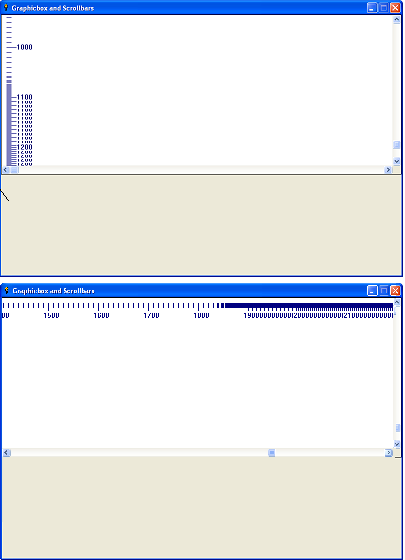
The following code shows this glitch. Run the code and then scroll all the way down and then all the way to the right.
NomainwinThe fix? Uncomment the line
WindowWidth = 806
WindowHeight = 554
UpperLeftX = Int((DisplayWidth - WindowWidth)/2)
UpperLeftY = Int((DisplayHeight - WindowHeight)/2)
Graphicbox #main.gb, 0, 0, 800, 320
Open "Graphicbox and Scrollbars" for Window_nf as #main
#main, "Trapclose EndDemo"
#main, "Font Verdana 10 Bold"
#main.gb, "Horizscrollbar On 0 2000"
#main.gb, "Vertscrollbar On 0 1000"
#main.gb, "Down; Color Darkblue"
' #main.gb, "Place -20, -20; Boxfilled 2800 1320"
For x = 0 to 2780 Step 10 '2000 (max) + 800 (graphicbox width) - 20 = 1780
#main.gb, "Place ";x;" 10"
#main.gb, "North; Turn 180; Go 10"
If x / 100 = Int( x / 100 ) Then
#main.gb, "Go 10"
#main.gb, "Place ";x - 10;" 40"
#main.gb, "\";x
End If
Next x
For y = 0 to 1300 Step 10 '1000 (max) + 320 (graphicbox height) - 20 = 1300
#main.gb, "Place 10 ";y
#main.gb, "North; Turn 90; Go 10"
If y / 100 = Int( y / 100 ) Then
#main.gb, "Go 10"
#main.gb, "Place 30 ";y + 5
#main.gb, "\";y
End If
Next y
#main.gb, "Flush"
Wait
Sub EndDemo handle$
Close #main
End
End Sub
' #main.gb, "Place -20, -20; Boxfilled 2800 1320"and try the code again. The graphics now flush and persist properly. The filled box should fully extend beyond the borders of the desired visible scrolled area to be effective.
Scrolling Within the Program
The API call "SetScrollPos" allows the programmer to set the scrollbar positions. Pass Windows constants to the call to define the scrollbar (horizontal or vertical) and the amount to scroll. The position is the position of the Upper Left Corner. Some Windows constants include
- _SBS_HORZ ' Designates the Horizontal Scrollbar
- _WM_HSCROLL ' Windows Message to the Horizontal Scrollbar
- _SBS_VERT ' Designates the Vertical Scrollbar
- _WM_VSCROLL ' Windows Message to the Vertical Scrollbar
- _SB_THUMBPOSITION ' The Value Within the Range of the Scroll Limits
Setting the Scrollbar position requires first designating the Scrollbar to be set, then defining the desired position, and lastly posting that message to the scrollbar.
CallDLL #user32, "SetScrollPos", _The API call "GetScrollPos" returns the current position of the Scrollbar.
handle as Ulong, _ 'handle of the graphicbox
scrollDir as Long, _ '_SBS_HORZ or _SBS_VERT
pos as Long, _ 'Desired Position
1 as Boolean, _ 'Flag to Repaint the Scrollbar Control
result as Long 'Returned Value
'The position must then be multiplied by &H10000 and added to _SB_THUMBPOSITION
hPos = pos * HexDec("&H10000") + _SB_THUMBPOSITION
CallDLL #user32, "PostMessageA", _
handle as Ulong, _ 'handle of the Graphicbox
scrollFlag as Long, _ '_WM_HSCROLL or _WM_VSCROLL
hPos as Long, _ 'Position in hexadecimal + H10000
0 as Long, _ 'No significance
result as Boolean 'Returned Value
 CallDLL #user32, "GetScrollPos", _
 handle As Ulong, _ 'handle of the Graphicbox
 scrollDir as Long, _ '_SBS_HORZ or _SBS_VERT
 resultPos as Long 'The Position in decimal format
Graphicbox and Scrollbars Demo
Copy and paste the following demo to your favorite Liberty BASIC IDE. No external files are required.
 Nomainwin
 WindowWidth = 800
 WindowHeight = 554

 UpperLeftX = Int((DisplayWidth - WindowWidth)/2)
 UpperLeftY = Int((DisplayHeight - WindowHeight)/2)

 Graphicbox #main.gb, 0, 0, 520, 520
 Button #main.b1, "Scroll Left Most", ScrollButtonSet, UL, 560, 50, 180, 40
 Button #main.b2, "Scroll Right Most", ScrollButtonSet, UL, 560, 100, 180, 40
 Button #main.b3, "Scroll To Top", ScrollButtonSet, UL, 560, 150, 180, 40
 Button #main.b4, "Scroll To Bottom", ScrollButtonSet, UL, 560, 200, 180, 40
 Button #main.b5, "HScroll --> ", ScrollButtonSet, UL, 560, 250, 120, 40
 Textbox #main.tb5, 690, 255, 50, 30
 Button #main.b6, "VScroll --> ", ScrollButtonSet, UL, 560, 300, 120, 40
 Textbox #main.tb6, 690, 305, 50, 30
 Stylebits #main.b7, _BS_MULTILINE, 0, 0, 0
 Button #main.b7, "Horizontal Thumbposition", ScrollButtonGet, UL, 560, 370, 120, 40
 Statictext #main.st7, "0", 690, 380, 50, 30
 Stylebits #main.b8, _BS_MULTILINE, 0, 0, 0
 Button #main.b8, "Vertical Thumbposition", ScrollButtonGet, UL, 560, 420, 120, 40
 Statictext #main.st8, "0", 690, 430, 50, 30
 Open "Graphicbox and Scrollbars" for Window as #main
 #main, "Trapclose EndDemo"
 #main, "Font Verdana 10 Bold"
 #main.gb, "Vertscrollbar On 0 500"
 #main.gb, "Horizscrollbar On 0 500" '
 #main.gb, "Down; Fill Darkblue; Color Lightgray; Backcolor Darkblue"
 For x = 0 to 1000 Step 10
 #main.gb, "Place ";x;" 10"
 #main.gb, "North; Turn 180; Go 10"
 If x / 100 = Int( x / 100 ) Then
 #main.gb, "Go 10"
 #main.gb, "Place ";x - 10;" 20"
 #main.gb, "\";x
 End If
 Next x
 For y = 0 to 1000 Step 10
 #main.gb, "Place 10 ";y
 #main.gb, "North; Turn 90; Go 10"
 If y / 100 = Int( y / 100 ) Then
 #main.gb, "Go 10"
 #main.gb, "Place 30 ";y + 5
 #main.gb, "\";y
 End If
 Next y
 #main.gb, "Flush"
 Wait

 Sub EndDemo handle$
 Close #main
 End
 End Sub

 Sub ScrollButtonSet handle$
 nExtension$ = Right$(handle$, 1)
 Select Case Val(nExtension$)
 Case 1
 pos = 0
 scrollDir = _SBS_HORZ
 scrollFlag = _WM_HSCROLL
 Case 2
 pos = 500
 scrollDir = _SBS_HORZ
 scrollFlag = _WM_HSCROLL
 Case 3
 pos = 0
 scrollDir = _SBS_VERT
 scrollFlag = _WM_VSCROLL
 Case 4
 pos = 500
 scrollDir = _SBS_VERT
 scrollFlag = _WM_VSCROLL
 Case 5
 #main.tb5, "!Contents? pos$"
 pos = Val(pos$)
 scrollDir = _SBS_HORZ
 scrollFlag = _WM_HSCROLL
 Case 6
 #main.tb6, "!Contents? pos$"
 pos = Val(pos$)
 scrollDir = _SBS_VERT
 scrollFlag = _WM_VSCROLL
 End Select
 Call SetScrollPos hWnd(#main.gb), pos, scrollDir, scrollFlag
 End Sub

 Sub ScrollButtonGet handle$
 nExtension$ = Right$(handle$, 1)
 Select Case Val(nExtension$)
 Case 7
 scrollDir = _SBS_HORZ
 Case 8
 scrollDir = _SBS_VERT
 End Select
 pos = GetScrollPos(hWnd(#main.gb), scrollDir)
 handle$ = "#main.st";nExtension$
 #handle$, pos
 End Sub


 Sub SetScrollPos handle, pos, scrollDir, scrollFlag
 CallDLL #user32, "SetScrollPos", _
 handle as Ulong, _
 scrollDir as Long, _
 pos as Long, _
 1 as Boolean, _
 result as Long
 hPos = pos * HexDec("&H10000") + _SB_THUMBPOSITION
 CallDLL #user32, "PostMessageA", _
 handle as Ulong, _
 scrollFlag as Long, _
 hPos as Long, _
 0 as Long, _
 result as Boolean
 End Sub

 Function GetScrollPos(handle, scrollDir)
 CallDLL #user32, "GetScrollPos", _
 handle As Ulong, _
 scrollDir as Long, _
 GetScrollPos as Long
 End Function
This article first appeared in Issue #139 (December 2005) of the Liberty BASIC Newsletter .