Older Version
Newer Version
 Alyce
Feb 13, 2012
Alyce
Feb 13, 2012
GDI Pens and Brushes
Native Graphic Colors | GDI Brushes and Pens in Liberty BASIC | CreatePen | SelectObject | DeleteObject | CreateSolidBrush | CreateHatchBrush | GDI Drawn Objects | Demo
Some text below is copied from the Microsoft Developers Network Library.
For an eBook or printed book on using the API with Liberty BASIC, see:
APIs for Liberty BASIC
Windows GDI creates colored pens with CreatePen . GDI creates brushes with CreateSolidBrush and CreateHashBrush .
CreatePen has three input parameters. You must specify a style, a width and a color. All styles other than a solid pen must be one pixel wide. If a different width is specified, the pen style defaults to solid.
The pen styles are as follows:
The color value is a long integer created from the desired red, green and blue values. See GDI and the Device Context for more on long color values.
Only one brush may be selected into a Device Context at one time. We do this with SelectObject * just as we did for the created pen discussed earlier. We reserve the handle of the default brush to select back into the Device Context later, just as we did for the pen.
CreateHatchBrush also requires a long color value for the brush.
Once created, it may be selected into a Device Context in exactly the same way as the pen and solid brush discussed earlier. Like them, it must be deleted when no longer needed, in order to free memory.
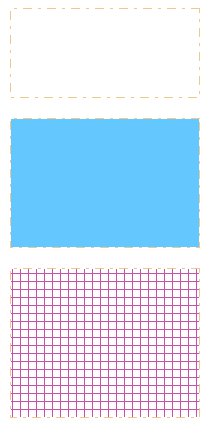
Run the code and you will see this:
GDI Tutorials Home
Native Graphic Colors | GDI Brushes and Pens in Liberty BASIC | CreatePen | SelectObject | DeleteObject | CreateSolidBrush | CreateHatchBrush | GDI Drawn Objects | Demo
Some text below is copied from the Microsoft Developers Network Library.
For an eBook or printed book on using the API with Liberty BASIC, see:
APIs for Liberty BASIC
Native Graphic Colors
Liberty BASIC's color statement causes graphics to be drawn in with a pen of the specified color. Liberty BASIC's backcolor statement causes graphics ojects to be filled with a brush of the specified color.Windows GDI creates colored pens with CreatePen . GDI creates brushes with CreateSolidBrush and CreateHashBrush .
GDI Brushes and Pens in Liberty BASIC
Pens and brushes can be created with GDI commands, then selected into the Device Context of a graphicbox. (See earlier lessons in this series for more on Device Contexts.) Liberty BASIC will use these pens and brushes when drawing objects such as "box", "boxfilled", "circle", "circlefilled" and so on.CreatePen
Pens are the equivalent of Liberty BASIC's graphics "color" statement. When a pen is selected into a Device Context it is used to draw the outlines of objects, such as circles, lines, etc. Only one pen may be selected into a Device Context at a time. The selected pen is used for all drawing until another pen is selected. The default pen in a Device Context is a solid, black pen that is one pixel in width.CreatePen has three input parameters. You must specify a style, a width and a color. All styles other than a solid pen must be one pixel wide. If a different width is specified, the pen style defaults to solid.
The pen styles are as follows:
The color value is a long integer created from the desired red, green and blue values. See GDI and the Device Context for more on long color values.
 calldll #gdi32,"CreatePen",_
 style as long,_ 'pen style
 width as long,_ 'width in pixels
 rgbCol as long,_ 'long color value
 CreatePen as ulong 'handle to pen
 end function
SelectObject
The pen is not used until it is selected into the Device Context with SelectObject . The function returns the handle of the original object of the type and this default object can be selected back into the Device Context later.CallDLL #gdi32,"SelectObject",_
hDC as uLong,_ 'handle of DC
hObj as uLong,_ 'handle of object to select
SelectObject as uLong 'returns previously selected object
DeleteObject
When an object is no longer needed, we use DeleteObject to free the memory consumed by the object. Do not attempt to delete an object that is currently selected into a Device Context. We first use SelectObject to select the default object back into the Device Context. We may then delete the created object, like so:CallDLL #gdi32,"DeleteObject",_
hObj as uLong,_ 'handle of object
r As Boolean
CreateSolidBrush
A solid brush is created with this code, which requires a long color value and returns the handle of the solid brush:calldll #gdi32, "CreateSolidBrush",_
rgbCol as long,_ 'long color value
CreateSolidBrush as ulong 'returns handle of brush
Only one brush may be selected into a Device Context at one time. We do this with SelectObject * just as we did for the created pen discussed earlier. We reserve the handle of the default brush to select back into the Device Context later, just as we did for the pen.
CreateHatchBrush
A hatch brush is not a solid color; it has a cross-hatched pattern. The styles may be any of the following.CreateHatchBrush also requires a long color value for the brush.
calldll #gdi32, "CreateHatchBrush",_
style as long,_ 'brush style
rgbCol as long,_ 'long color value
CreateHatchBrush as ulong 'handle of brush
Once created, it may be selected into a Device Context in exactly the same way as the pen and solid brush discussed earlier. Like them, it must be deleted when no longer needed, in order to free memory.
GDI Drawn Objects
The examples here demonstrate the creation of pens and brushes and their use with native Liberty BASIC drawing commands. We can also draw graphics with GDI commands, using these pens and brushes. We can even draw on memory Device Contexts. This will be covered in a later lesson.Demo
Run the code and you will see this:
nomainwin
winWide=700:winHigh=500
WindowWidth=winWide+50:WindowHeight=winHigh+50
UpperLeftX=1:UpperLeftY=1
graphicbox #1.g, 0,0,winWide,winHigh
open "GDI Demo" for window as #1
#1 "trapclose [quit]"
#1.g "down"
hDC = GetDC(hwnd(#1.g)) 'device context handle of graphicbox
hPen = CreatePen(_PS_DASHDOT,1,MakeRGB(240,200,140))
oldPen = SelectObject(hDC,hPen)
#1.g "place 10 10; box 200 100"
hBrush = CreateSolidBrush(MakeRGB(100,200,255))
oldBrush = SelectObject(hDC,hBrush)
#1.g "place 10 120; boxfilled 200 250"
hHatch = CreateHatchBrush(_HS_CROSS,MakeRGB(200,80,170))
hObj = SelectObject(hDC,hHatch)
#1.g "place 10 270; boxfilled 200 420"
wait
[quit]
re = SelectObject(hDC,oldPen)
re = SelectObject(hDC,oldBrush)
call ReleaseDC hwnd(#1.g),hDC
call DeleteObject hPen
close #1:end
function CreateSolidBrush(rgbCol)
calldll #gdi32, "CreateSolidBrush",_
rgbCol as long,_ 'long color value
CreateSolidBrush as ulong 'returns handle of brush
end function
function CreateHatchBrush(style,rgbCol)
'_HS_BDIAGONAL 45-degree upward left-to-right hatch
'_HS_CROSS Horizontal and vertical crosshatch
'_HS_DIAGCROSS 45-degree crosshatch
'_HS_FDIAGONAL 45-degree downward left-to-right hatch
'_HS_HORIZONTAL Horizontal hatch
'_HS_VERTICAL Vertical hatch
calldll #gdi32, "CreateHatchBrush",_
style as long,_ 'brush style
rgbCol as long,_ 'long color value
CreateHatchBrush as ulong 'handle of brush
end function
function CreatePen(style,width,rgbCol)
'styles
'_PS_SOLID The pen is solid.
'_PS_DASH The pen is dashed. Width MUST be one.
'_PS_DOT The pen is dotted. Width MUST be one.
'_PS_DASHDOT The pen has alternating dashes and dots. Width MUST be one.
'_PS_DASHDOTDOT The pen has alternating dashes and double dots. Width MUST be one.
'_PS_NULL The pen is invisible.
'If width is >1 a solid pen is created.
calldll #gdi32,"CreatePen",_
style as long,_ 'pen style
width as long,_ 'width in pixels
rgbCol as long,_ 'long color value
CreatePen as ulong 'handle to pen
end function
function MakeRGB(red,green,blue)
if red<0 then red=0
if red>255 then red=255
if green<0 then green=0
if green>255 then green=255
if blue<0 then blue=0
if blue>255 then blue=255
MakeRGB=(blue*256*256)+(green*256)+red
end function
function GetDC(h)
'get device context for window:
calldll #user32, "GetDC",_
h as ulong,_ 'graphicbox handle
GetDC as ulong 'returns handle to device context
end function
function SelectObject(hDC, hObj)
 CallDLL #gdi32,"SelectObject",_
 hDC as uLong,_ 'handle of DC
 hObj as uLong,_ 'handle of object to select
 SelectObject as uLong 'returns previously selected object
end function
sub DeleteObject hObj
CallDLL #gdi32,"DeleteObject",_
hObj as uLong,_
r As Boolean
end sub
sub ReleaseDC h, hdc
calldll #user32, "ReleaseDC",_
h as ulong,_ 'window handle
hdc as ulong,_ 'device context
ret as long
end sub
GDI Tutorials Home