Older Version
Newer Version
 Alyce
Jul 9, 2011
Alyce
Jul 9, 2011
QCard DLL Lesson 3 4
Lesson 3 Lesson 5 -
 Alyce
Alyce QCard DLL Lesson
See Lesson 1 for QCard DLL and WAV files needed for the demo code.
Which card was clicked?
We must have some way to discover which card is clicked by the user. The cards are displayed in a graphicbox or graphics window, so we can trap mouse events. We'll trap the leftButtonUp event. To do this, we must first setfocus to the graphicbox. When the left button is released, we go to a branch label where we do the checking.
 'trap mouse clicks:
 #1.g "setfocus; when leftButtonUp [checkIndex]"
When the cards are dealt, they are placed in a grid that is 100x100, so it is easy to determine which card is clicked by checking mouse position. Actual card height is about 100 pixels, and width is about 80 pixels.
Mouse position is contained in the variables MouseX and MouseY . To make the lines of code shorter, we've copied these values into mx and my .
mx=MouseX : my=MouseY 'mouse x and y location
Once we know the mouse coordinates, we can check them against the card coordinates to see which card from our card array was clicked. We start by determining the row. We'll use Select Case to do this. Once a case has been satisfied, the program quits checking and jumps to the End Select line. We've set up our Select Case statement without a case specified. This allows us to use an expression after each Case statement.
First, we'll check to see if the mouse Y coordinate is less than or equal to 102, placing it in the first row of cards. If it is, we do more checking for the x coordinate, then jump out to the End Select line.
case my<=102 'first row
Each additional row is 100 pixels lower than the previous row. This code checks to see which of the four rows contains the mouse click.
 select case
 case my<=102 'first row
 'more code here
 case (my>=102) and (my<202) 'second row
 'more code here
 case (my>=202) and (my<302) 'third row
 'more code here
 case (my>=302) and (my<402) 'fourth row
 'more code here
 end select
The first six cards are dealt in the first row. To check which of the cards in the first row was clicked, we check the x location and set the variable clickCard equal to the index of the card:
 if mx<=90 then clickCard=1
 if (mx>=110) and (mx<=190) then clickCard=2
 if (mx>=210) and (mx<=290) then clickCard=3
 if (mx>=310) and (mx<=390) then clickCard=4
 if (mx>=410) and (mx<=490) then clickCard=5
 if (mx>=510) and (mx<=590) then clickCard=6
We perform a similar check on the second row, then on the third and fourth rows. The second row check:
 if mx<=90 then clickCard=7
 if (mx>=110) and (mx<=190) then clickCard=8
 if (mx>=210) and (mx<=290) then clickCard=9
 if (mx>=310) and (mx<=390) then clickCard=10
 if (mx>=410) and (mx<=490) then clickCard=11
 if (mx>=510) and (mx<=590) then clickCard=12
Turning it Over
Once we know which card in the array was clicked, we want to turn it over so that the user can see the face. We've discussed changing the card from face-down to face-up in a previous lesson. After we make the change, we want to deal the card again in with its face up.
 'turn card so that it is face up
 Call SetCardStatus card(clickCard), 1
 'deal card again so that it displays face up
 Call DealCard hBox, card(clickCard), x, y
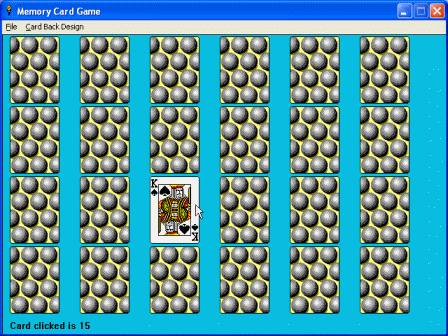
Card Coordinates
We need to know where to deal the card in a face-up position. The mouse coordinates do not equal the card's upper left coordinates. We can figure the card coordinates at the same time as we find out which card was clicked. We set the variables x and y to equal the proper upper left coordinates for the card that was clicked, right in our Select Case routine:
 select case
 case my<=102 'first row
 y=2
 if mx<=90 then clickCard=1:x=10
 if (mx>=110) and (mx<=190) then clickCard=2:x=110
 if (mx>=210) and (mx<=290) then clickCard=3:x=210
 if (mx>=310) and (mx<=390) then clickCard=4:x=310
 if (mx>=410) and (mx<=490) then clickCard=5:x=410
 if (mx>=510) and (mx<=590) then clickCard=6:x=510
 case (my>=102) and (my<202) 'second row
 y=102
 if mx<=90 then clickCard=7:x=10
 if (mx>=110) and (mx<=190) then clickCard=8:x=110
 if (mx>=210) and (mx<=290) then clickCard=9:x=210
 if (mx>=310) and (mx<=390) then clickCard=10:x=310
 if (mx>=410) and (mx<=490) then clickCard=11:x=410
 if (mx>=510) and (mx<=590) then clickCard=12:x=510
 case (my>=202) and (my<302) 'third row
 y=202
 if mx<=90 then clickCard=13:x=10
 if (mx>=110) and (mx<=190) then clickCard=14:x=110
 if (mx>=210) and (mx<=290) then clickCard=15:x=210
 if (mx>=310) and (mx<=390) then clickCard=16:x=310
 if (mx>=410) and (mx<=490) then clickCard=17:x=410
 if (mx>=510) and (mx<=590) then clickCard=18:x=510
 case (my>=302) and (my<402) 'fourth row
 y=302
 if mx<=90 then clickCard=19:x=10
 if (mx>=110) and (mx<=190) then clickCard=20:x=110
 if (mx>=210) and (mx<=290) then clickCard=21:x=210
 if (mx>=310) and (mx<=390) then clickCard=22:x=310
 if (mx>=410) and (mx<=490) then clickCard=23:x=410
 if (mx>=510) and (mx<=590) then clickCard=24:x=510
 case else
 clickCard=0
 end select
For the sake of this demo, we've noted the index of the card clicked by placing text at the bottom of the window.
 #1.g "place 10 420"
 #1.g "\Card clicked is " ; clickCard ; space$(400)
The Mouse Click Checking Routine
Here is the entire routine. The complete demo is at the end of this article.
 [checkIndex]
 clickCard=0:x=0:y=0 'reset values
 mx=MouseX : my=MouseY 'mouse x and y location
 'Cards are placed in a grid that is 100x100,
 'so it is easy to determine which card is clicked
 'by checking mouse position. Card height is about
 '100, and width is about 80.
 'Index of clicked card is placed in var called clickCard
 'and x,y locations are placed in vars called x and y.
 'MouseY determines row, and MouseX determines column.
 select case
 case my<=102 'first row
 y=2
 if mx<=90 then clickCard=1:x=10
 if (mx>=110) and (mx<=190) then clickCard=2:x=110
 if (mx>=210) and (mx<=290) then clickCard=3:x=210
 if (mx>=310) and (mx<=390) then clickCard=4:x=310
 if (mx>=410) and (mx<=490) then clickCard=5:x=410
 if (mx>=510) and (mx<=590) then clickCard=6:x=510
 case (my>=102) and (my<202) 'second row
 y=102
 if mx<=90 then clickCard=7:x=10
 if (mx>=110) and (mx<=190) then clickCard=8:x=110
 if (mx>=210) and (mx<=290) then clickCard=9:x=210
 if (mx>=310) and (mx<=390) then clickCard=10:x=310
 if (mx>=410) and (mx<=490) then clickCard=11:x=410
 if (mx>=510) and (mx<=590) then clickCard=12:x=510
 case (my>=202) and (my<302) 'third row
 y=202
 if mx<=90 then clickCard=13:x=10
 if (mx>=110) and (mx<=190) then clickCard=14:x=110
 if (mx>=210) and (mx<=290) then clickCard=15:x=210
 if (mx>=310) and (mx<=390) then clickCard=16:x=310
 if (mx>=410) and (mx<=490) then clickCard=17:x=410
 if (mx>=510) and (mx<=590) then clickCard=18:x=510
 case (my>=302) and (my<402) 'fourth row
 y=302
 if mx<=90 then clickCard=19:x=10
 if (mx>=110) and (mx<=190) then clickCard=20:x=110
 if (mx>=210) and (mx<=290) then clickCard=21:x=210
 if (mx>=310) and (mx<=390) then clickCard=22:x=310
 if (mx>=410) and (mx<=490) then clickCard=23:x=410
 if (mx>=510) and (mx<=590) then clickCard=24:x=510
 case else
 clickCard=0
 end select

 if clickCard=0 then wait
 'turn card so that it is face up
 Call SetCardStatus card(clickCard), 1
 'deal card again so that it displays face up
 Call DealCard hBox, card(clickCard), x, y

 #1.g "place 10 420"
 #1.g "\Card clicked is " ; clickCard ; space$(400)
 wait
DEMO
See Lesson 1 for QCard DLL and WAV files needed for the demo code.
 'An open project card game, begun by Alyce Watson, May 27, 2003.
 'Uses Qcard32.dll, a freeware library of playing card images.
 'DLL by Stephen Murphy. Qcard32.DLL website:
 'http://www.telusplanet.net/public/stevem/

 'new in cards4.bas:
 'Cards are dealt face down.
 'When user clicks with mouse, value of card under
 'mouse is checked and reported and card status is
 'changed to face up. Card is redealt so it will appear
 'in face up position.


 'new this time:
 clickCard=0 'index of current card clicked by user

 [varSetup]
 i=0 'i will be our counter var in for/next loops
 design=1 'default design is circles
 dim card(24)'array to hold cards
 newIndex=0 'used when shuffling
 tempCard=0 'temp var used when shuffling
 gosub [fillCardArray] 'fill array with card values

 nomainwin
 WindowWidth=640:WindowHeight=480
 UpperLeftX=1:UpperLeftY=1

 menu #1, "&File", "&New",[new],"E&xit", [quit]
 menu #1, "&Card Back Design","&Circles",[circles],"&Blue",[blue],_
 "&Red",[red],"&Mountain",[mountain],"&Purple",[purple],"M&usic",[music]
 graphicbox #1.g, 0, 0, 640, 440
 open "Memory Card Game" for window_nf as #1
 #1 "trapclose [quit]"

 'trap mouse clicks:
 #1.g "setfocus; when leftButtonUp [checkIndex]"

 'get graphicbox handle
 hBox=hwnd(#1.g)

 'open the dll
 open "qcard32.dll" for dll as #qc
 'initialize the deck
 Call InitializeDeck hBox

 [new]
 Call SetDefaultValues
 Call SetCurrentBack design

 'draw a nice background
 #1.g "down; fill 10 190 225"
 #1.g "backcolor 10 190 225"
 'temp message for this demo only
 #1.g "place 10 420"
 #1.g "\Try Menu File -> New Game to shuffle deck."
 gosub [shuffleCards]

 'set xy location to start deal
 x=10:y=2
 for i = 1 to 24
 'set status of all cards to 0, which is face down
 Call SetCardStatus card(i), 0

 'deal cards
 Call DealCard hBox,card(i),x,y

 x=x+100
 if x>510 then 'move to next row
 x=10
 y=y+100
 end if
 playwave "card.wav",sync

 'pause 100 milliseconds between cards
 call Pause 100
 scan
 next
 wait


 [checkIndex]
 clickCard=0:x=0:y=0 'reset values
 mx=MouseX : my=MouseY 'mouse x and y location
 'Cards are placed in a grid that is 100x100,
 'so it is easy to determine which card is clicked
 'by checking mouse position. Card height is about
 '100, and width is about 80.
 'Index of clicked card is placed in var called clickCard
 'and x,y locations are placed in vars called x and y.
 'MouseY determines row, and MouseX determines column.
 select case
 case my<=102 'first row
 y=2
 if mx<=90 then clickCard=1:x=10
 if (mx>=110) and (mx<=190) then clickCard=2:x=110
 if (mx>=210) and (mx<=290) then clickCard=3:x=210
 if (mx>=310) and (mx<=390) then clickCard=4:x=310
 if (mx>=410) and (mx<=490) then clickCard=5:x=410
 if (mx>=510) and (mx<=590) then clickCard=6:x=510
 case (my>=102) and (my<202) 'second row
 y=102
 if mx<=90 then clickCard=7:x=10
 if (mx>=110) and (mx<=190) then clickCard=8:x=110
 if (mx>=210) and (mx<=290) then clickCard=9:x=210
 if (mx>=310) and (mx<=390) then clickCard=10:x=310
 if (mx>=410) and (mx<=490) then clickCard=11:x=410
 if (mx>=510) and (mx<=590) then clickCard=12:x=510
 case (my>=202) and (my<302) 'third row
 y=202
 if mx<=90 then clickCard=13:x=10
 if (mx>=110) and (mx<=190) then clickCard=14:x=110
 if (mx>=210) and (mx<=290) then clickCard=15:x=210
 if (mx>=310) and (mx<=390) then clickCard=16:x=310
 if (mx>=410) and (mx<=490) then clickCard=17:x=410
 if (mx>=510) and (mx<=590) then clickCard=18:x=510
 case (my>=302) and (my<402) 'fourth row
 y=302
 if mx<=90 then clickCard=19:x=10
 if (mx>=110) and (mx<=190) then clickCard=20:x=110
 if (mx>=210) and (mx<=290) then clickCard=21:x=210
 if (mx>=310) and (mx<=390) then clickCard=22:x=310
 if (mx>=410) and (mx<=490) then clickCard=23:x=410
 if (mx>=510) and (mx<=590) then clickCard=24:x=510
 case else
 clickCard=0
 end select

 if clickCard=0 then wait
 'turn card so that it is face up
 Call SetCardStatus card(clickCard), 1
 'deal card again so that it displays face up
 Call DealCard hBox, card(clickCard), x, y

 #1.g "place 10 420"
 #1.g "\Card clicked is " ; clickCard ; space$(400)
 wait


 'setting new card back doesn't restart game,
 'so new back won't show until new game is started:
 [circles] design=1:goto [setDesign]
 [blue] design=2:goto [setDesign]
 [red] design=3:goto [setDesign]
 [mountain] design=4:goto [setDesign]
 [purple] design=5:goto [setDesign]
 [music] design=6:goto [setDesign]

 [setDesign]
 Call SetCurrentBack design
 'design can be 1,2,3,4,5,6 for 6 possible designs
 wait


 [fillCardArray]
 'fill card array
 'cards 1 to 52 are in the first deck
 'cards 53 to 104 are in the second deck
 'use cards Jack through King in each suit, first deck
 card(1)=11 'jack of clubs
 card(2)=12 'queen
 card(3)=13 'king
 card(4)=24 'jack of diamonds
 card(5)=25 'queen
 card(6)=26 'king
 card(7)=37 'jack of hearts
 card(8)=38 'queen
 card(9)=39 'king
 card(10)=50 'jack of spades
 card(11)=51 'queen
 card(12)=52 'king

 'now use second deck, to fill second half of array
 for i = 1 to 12
 card(i+12)=card(i)+52
 next
 RETURN


 [shuffleCards]
 playwave "shuffle.wav",async
 'now shuffle cards
 for i = 1 to 24
 newIndex=int(rnd(0)*24)+1
 tempCard=card(i) 'temp var to allow switching values
 card(i)=card(newIndex) 'this index now contains value from random index
 card(newIndex)=tempCard 'random index now contains value from other index
 'now card(i) has switched values with a random card in the array
 next
 playwave "shuffle.wav",sync
 RETURN

 [quit] close #qc:close #1:end


 ''''''''''''''''''''
 'subs and functions:
 Sub Pause ms
 'pause ms number of milliseconds
 calldll #kernel32,"Sleep",_
 ms as long, re as void
 End Sub


 Sub InitializeDeck hndle
 calldll #qc, "InitializeDeck",_
 hndle as ulong,r as long
 End Sub

 Sub SetCardStatus nC,face
 'nC is number of card - 1-52 in first deck and
 '53-104 in second deck, if used
 'face: 0=facedown,1=faceup
 calldll #qc, "SetCardStatus",nC as long,_
 face as long,r as void
 End Sub

 Sub DealCard hndle,nC,x,y
 'places card on window whose handle is hndle at x,y
 'nC is number of card - 1-52 in first deck and
 '53-104 in second deck, if used
 calldll #qc, "DealCard",hndle as ulong,nC as long,_
 x as long,y as long,r as void
 End Sub

 Sub SetCurrentBack nV
 'nV can be 1,2,3,4,5,6 for 6 possible designs
 calldll #qc, "SetCurrentBack",nV as long,r as void
 End Sub

 Sub SetDefaultValues
 'reset all card properties back to their default values.
 calldll #qc, "SetDefaultValues",r as void
 End Sub
QCard DLL Lesson
Lesson 3 Lesson 5