Older Version
Newer Version
 Alyce
Jun 13, 2011
Alyce
Jun 13, 2011
Shell About Box
- Alyce
Alyce Shell About Box | Notice for About Box | Shell About Box | Default Icon | Custom Icon
Notice for About Box
This article shows you how to create a professional "about box" for your application. We often use a simple NOTICE message to give this information to the user, but the Windows Shell About Box displays a more professional, polished appearance.Here is a screenshot of a NOTICE about box, and screenshot of a ShellAboutA box.
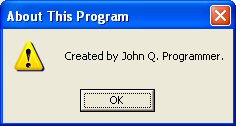
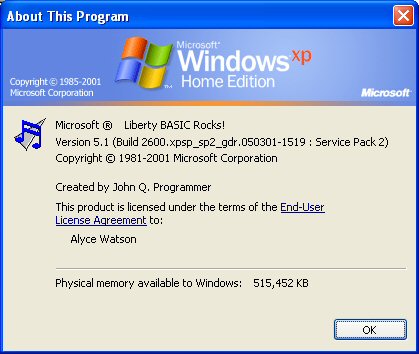
Shell About Box
It is easy to invoke a special dialog to give "about" information for a program. This built-in dialog displays operating system information, including the version of Windows and the current free system resources. The function is part of shell32.dll and is called ShellAboutA.It requires several parameters. They are
hWnd Identifies a parent window. This parameter can be NULL (equal to 0). Use the HWND() function to get the handle of a window, if desired.
szApp$ A ptr to text that the function displays in the title bar of the Shell About dialog box and on the first line of the dialog box after the text "Microsoft Windows" or "Microsoft Windows NT." If the text contains a "#" separator dividing it into two parts, the function displays the first part in the title bar, and the second part on the first line after the text "Microsoft Windows" or "Microsoft Windows NT." See the screenshots below.
szOtherStuff$ A ptr to text that the function displays in the dialog box after the version and copyright information.
hIcon Identifies the handle of an icon that the function displays in the dialog box. If this parameter is NULL (equal to 0), the function simply displays the Microsoft Windows or Microsoft Windows NT icon. An icon can be loaded from a disk file with either ExtractIconA or LoadImageA , and the icon handle returned by these functions can be used with ShellAboutA. The desired icon will be added to the display in the Shell About Box. Use either of these functions to load the icon:
 file$="iconname.ico"

 CallDLL #shell32, "ExtractIconA", 0 As long,_
 file$ As ptr,_ 'disk filename of icon
 0 As long,_ 'index = 0 is first icon in file
 hIcon As ulong 'handle of icon

 OR

 calldll #user32, "LoadImageA",_
 0 as long,_ 'instance - use 0 for image from file
 file$ as ptr,_ 'path and filename of image
 _IMAGE_ICON as long,_'type is icon
 width as long,_ 'desired width
 height as long,_ 'desired height
 _LR_LOADFROMFILE as long,_ 'load flag
 hIcon as ulong 'handle of loaded icon
Default Icon
Here is a small demo program that uses only the default icon. You can copy this code and paste it into the Liberty BASIC editor to run it.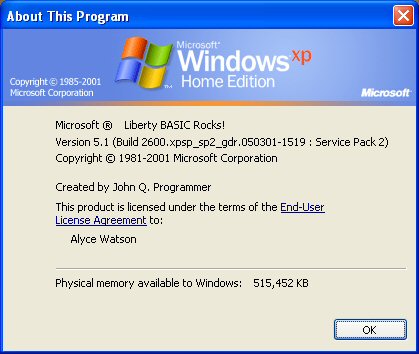
 szApp$="About This Program # Liberty BASIC Rocks!"
 cr$ = chr$(13) 'carriage return
 szOtherStuff$ = cr$ + "Created by John Q. Programmer" + cr$
 hIcon=0
 hWnd=0

 calldll #shell32, "ShellAboutA",_
 hWnd as ulong,_
 szApp$ as ptr,_
 szOtherStuff$ as ptr,_
 hIcon as ulong,_
 ret as long
Custom Icon
Here is a shell about box that adds a custom icon file. You may right click on this icon and save it to disk if you'd like to try it in the code. You can, of course, use any icon of your choice. nomainwin
button #1.b, "About", [about], UL, 10,10
open "My App" for window as #1
#1 "trapclose [quit]"
wait
[quit] close #1:end
[about]
icon$ = "icon.ico"
CallDLL #shell32, "ExtractIconA",_
0 As long,_
icon$ As ptr,_ 'disk filename of icon
0 As long,_ 'index = 0 is first icon in file
hIcon As ulong 'handle of icon
hndle = hwnd(#1)
szApp$="About This Program # Liberty BASIC Rocks!"
cr$ = chr$(13) 'carriage return
szOtherStuff$ = cr$ + "Created by John Q. Programmer" + cr$
calldll #shell32, "ShellAboutA",_
hndle as ulong,_ 'window handle
szApp$ as ptr,_ 'app name
szOtherStuff$ as ptr,_ 'info
hIcon as ulong,_ 'icon handle
ret as long
wait