Older Version
Newer Version
 RodBird
Nov 23, 2015
RodBird
Nov 23, 2015
StretchBlt
- Alyce
Alyce
Native Commands for Memory Bmp | hBmp() | SelectObject | StretchBlt | Syntax of StretchBlt | Flipping and Mirroring | Placement for Flipping and Mirroring | SetStretchBltMode | SetStretchBltMode Syntax | Stretching Modes | Stretch Demo | Mirror-Stretch Demo Some text below is copied from the Microsoft Developers Network Library.
For an eBook or printed book on using the API with Liberty BASIC, see:
APIs for Liberty BASIC
The graphics command "GETBMP" captures an image from the graphicbox into memory. It looks like this:
We give the captured image a one-word name. In this example, it is "display". We also specify the X location to begin the capture, the Y location to begin the capture, the width to capture and the height to capture.
To use the image captured into memory with Liberty BASIC commands with API calls, we get its handle with hBmp(). We place the bitmap name inside of quotation marks, because it is a string.
We can use SelectObject to select the mrmory bitmap created by Liberty BASIC into a memory device context.
The source device context and the destination context can be the same or they can be different. They can be window or memory device contexts.
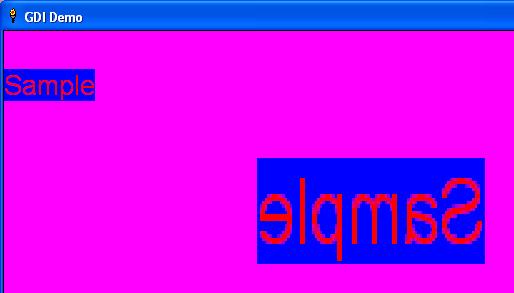
In addition to performing stretching or compressing, StretchBlt also allows a program to flip an image vertically, horizontally or both. By making either the Source Width and Height or the Destination Width and Height (but not both source and destination) a negative value, StretchBlt flips the image on the axis that has the negative value. If both the Source and the destination have a negative value, no flipping occurs. If a negative destination width is used, the image is mirrored side-to-side. If a negative destination height is used, the image is flipped top-to-bottom. If both destination width and height are passed as negative numbers, the effect of a 180 degree rotation is achieved.
The x, y placement for the image is always the starting point for the bit transfer. If a negative destination width is passed into the function, the transfer starts at the coordinates specified, but proceeds in the negative width direction. If the destination x-origin coordinate happens to be 0, the image is not visitble, because it displays off of the left side of the screen. If mirroring the image side-to-side, use a starting coordinate to designate where to place the RIGHT side of the image, rather than the usual LEFT side. The same is true for flipping top-to-bottom. If a negative height is passed into the StretchBlt function, the destination Y coordinate for placement should designate the BOTTOM rather than the usual TOP of the image.
If an image is to be mirrored, the x-origin must designate the desired RIGHT side coordinate to place the image. If the image is to be flipped, the y-origin must designate the desired BOTTOM coordinate to place the image. If it is to be both flipped and mirrored, then both origins must be shifted. Instead of indicating the upper left corner, these coordinates now indicate the lower right corner to position the image.
The SetStretchBltMode function sets the bitmap stretching mode in the specified device context.
The possible stretching modes are listed below. Precede the Windows Constant with an underscore to alert Liberty BASIC to use the proper value.
Here is a list of the modes, along with their descriptions.
The stretching mode defines how the system combines rows or columns of a bitmap with existing pixels on a display device when an application calls the StretchBlt function.
The BLACKONWHITE and WHITEONBLACK modes are typically used to preserve foreground pixels in monochrome bitmaps. The COLORONCOLOR mode is typically used to preserve color in color bitmaps.
The HALFTONE mode is slower and requires more processing of the source image than the other three modes; but produces higher quality images. Also note that SetBrushOrgEx must be called after setting the HALFTONE mode to avoid brush misalignment.
GDI Tutorials Home
-
Alyce Native Commands for Memory Bmp | hBmp() | SelectObject | StretchBlt | Syntax of StretchBlt | Flipping and Mirroring | Placement for Flipping and Mirroring | SetStretchBltMode | SetStretchBltMode Syntax | Stretching Modes | Stretch Demo | Mirror-Stretch Demo Some text below is copied from the Microsoft Developers Network Library.
For an eBook or printed book on using the API with Liberty BASIC, see:
APIs for Liberty BASIC
Native Commands for Memory Bmp
The graphics command "GETBMP" captures an image from the graphicbox into memory. It looks like this:
#1.g "getbmp display 0 0 160 190"
We give the captured image a one-word name. In this example, it is "display". We also specify the X location to begin the capture, the Y location to begin the capture, the width to capture and the height to capture.
hBmp()
To use the image captured into memory with Liberty BASIC commands with API calls, we get its handle with hBmp(). We place the bitmap name inside of quotation marks, because it is a string.
handleBmp = hbmp("display") SelectObject
We can use SelectObject to select the mrmory bitmap created by Liberty BASIC into a memory device context.
 CallDLL #gdi32,"SelectObject",_
 hMemDC as uLong,_ 'memory DC
 handleBmp as uLong,_ 'handle of bmp
 oldBmp as uLong 'returns previously selected bitmap
StretchBlt
The StretchBlt function copies a bitmap from a source rectangle into a destination rectangle, stretching or compressing the bitmap to fit the dimensions of the destination rectangle, if necessary. The system stretches or compresses the bitmap according to the stretching mode currently set in the destination device context.The source device context and the destination context can be the same or they can be different. They can be window or memory device contexts.
Syntax of StretchBlt
CallDll #gdi32, "StretchBlt", _
hDestDC as ulong,_ 'handle to destination DC
xDest as long,_ 'ulx location on destination
yDest as long,_ 'uly location on destination
wSrc as long,_ 'width to stretch to
hSrc as long,_ 'height to stretch to
hSrcDC as ulong,_ 'handle to source DC
xSrc as long,_ 'ulx location in source
ySrc as long,_ 'uly location in source
wSrc as long,_ 'width to take from source
hSrc as long,_ 'height to take from source
DWROP as ulong,_ 'The operation to be performed
result asbooleanlong 'nonzero if successful
Flipping and Mirroring
In addition to performing stretching or compressing, StretchBlt also allows a program to flip an image vertically, horizontally or both. By making either the Source Width and Height or the Destination Width and Height (but not both source and destination) a negative value, StretchBlt flips the image on the axis that has the negative value. If both the Source and the destination have a negative value, no flipping occurs. If a negative destination width is used, the image is mirrored side-to-side. If a negative destination height is used, the image is flipped top-to-bottom. If both destination width and height are passed as negative numbers, the effect of a 180 degree rotation is achieved.
Placement for Flipping and Mirroring
The x, y placement for the image is always the starting point for the bit transfer. If a negative destination width is passed into the function, the transfer starts at the coordinates specified, but proceeds in the negative width direction. If the destination x-origin coordinate happens to be 0, the image is not visitble, because it displays off of the left side of the screen. If mirroring the image side-to-side, use a starting coordinate to designate where to place the RIGHT side of the image, rather than the usual LEFT side. The same is true for flipping top-to-bottom. If a negative height is passed into the StretchBlt function, the destination Y coordinate for placement should designate the BOTTOM rather than the usual TOP of the image.
If an image is to be mirrored, the x-origin must designate the desired RIGHT side coordinate to place the image. If the image is to be flipped, the y-origin must designate the desired BOTTOM coordinate to place the image. If it is to be both flipped and mirrored, then both origins must be shifted. Instead of indicating the upper left corner, these coordinates now indicate the lower right corner to position the image.
SetStretchBltMode
The SetStretchBltMode function sets the bitmap stretching mode in the specified device context.
SetStretchBltMode Syntax
 calldll #gdi32, "SetStretchBltMode",_
 hdc as ulong,_ 'destination DC
 STRETCHMODE as long,_ 'mode
 result as long 'returns previous mode
Stretching Modes
The possible stretching modes are listed below. Precede the Windows Constant with an underscore to alert Liberty BASIC to use the proper value.
BLACKONWHITEbecomes
_BLACKONWHITE
Here is a list of the modes, along with their descriptions.
| BLACKONWHITE | Performs a Boolean AND operation using the color values for the eliminated and existing pixels. If the bitmap is a monochrome bitmap, this mode preserves black pixels at the expense of white pixels. |
| COLORONCOLOR | Deletes the pixels. This mode deletes all eliminated lines of pixels without trying to preserve their information. |
| HALFTONE | Maps pixels from the source rectangle into blocks of pixels in the destination rectangle. The average color over the destination block of pixels approximates the color of the source pixels. After setting the HALFTONE stretching mode, an application must call the SetBrushOrgEx function to set the brush origin. If it fails to do so, brush misalignment occurs. |
| WHITEONBLACK | Performs a Boolean OR operation using the color values for the eliminated and existing pixels. If the bitmap is a monochrome bitmap, this mode preserves white pixels at the expense of black pixels. |
The stretching mode defines how the system combines rows or columns of a bitmap with existing pixels on a display device when an application calls the StretchBlt function.
The BLACKONWHITE and WHITEONBLACK modes are typically used to preserve foreground pixels in monochrome bitmaps. The COLORONCOLOR mode is typically used to preserve color in color bitmaps.
The HALFTONE mode is slower and requires more processing of the source image than the other three modes; but produces higher quality images. Also note that SetBrushOrgEx must be called after setting the HALFTONE mode to avoid brush misalignment.
Stretch Demo
nomainwin
winWide=700:winHigh=500
WindowWidth=winWide+50:WindowHeight=winHigh+50
UpperLeftX=1:UpperLeftY=1
graphicbox #1.g, 0,0,winWide,winHigh
open "GDI Demo" for window as #1
#1 "trapclose [quit]"
#1.g "down; fill pink; backcolor blue; color red"
#1.g "font arial 20"
#1.g "\\\Sample"
'capture a bitmap in memory with native commands
#1.g "getbmp display 0 0 160 190"
'get handle for memory bmp
handleBmp = hbmp("display")
h=hwnd(#1.g) 'graphicbox handle
'get device context for window:
calldll #user32, "GetDC",_
h as ulong,_ 'graphicbox handle
hdc as ulong 'returns handle to device context
calldll #gdi32, "CreateCompatibleDC",_
hdc as ulong,_ 'graphicbox DC
hMemDC as ulong 'memory DC
CallDLL #gdi32,"SelectObject",_
hMemDC as uLong,_ 'memory DC
handleBmp as uLong,_ 'handle of bmp
oldBmp as uLong 'returns previously selected bitmap
calldll #gdi32, "SetStretchBltMode",_
hdc as ulong,_ 'destination DC
_COLORONCOLOR as long,_ 'mode
result as long 'returns previous mode
'capture image and place a resized copy next to the original
CallDll #gdi32, "StretchBlt", _
hdc as ulong,_ 'The destination DC = graphicbox
200 as long,_ 'x location on destination
0 as long,_ 'y location on destination
480 as long,_ 'width to stretch to
300 as long,_ 'height to stretch to
hMemDC as ulong,_ 'The source DC = memory
0 as long,_ 'x location in source
0 as long,_ 'y location in source
100 as long,_ 'width to take from source
90 as long,_ 'height to take from source
_SRCCOPY as ulong,_'The operation to be performed
result asbooleanlong 'nonzero if successful
wait
[quit]
calldll #gdi32, "DeleteDC",_
hMemDC as ulong,_ 'DC to delete
re as long 'nonzero=success
calldll #user32, "ReleaseDC",_
h as ulong,_ 'window handle
hdc as ulong,_ 'device context
ret as long
close #1:end
Mirror-Stretch Demo
nomainwin
winWide=700:winHigh=500
WindowWidth=winWide+50:WindowHeight=winHigh+50
UpperLeftX=1:UpperLeftY=1
graphicbox #1.g, 0,0,winWide,winHigh
open "GDI Demo" for window as #1
#1 "trapclose [quit]"
#1.g "down; fill pink; backcolor blue; color red"
#1.g "font arial 20"
#1.g "\\\Sample"
'capture a bitmap in memory with native commands
#1.g "getbmp display 0 0 160 190"
'get handle for memory bmp
handleBmp = hbmp("display")
h=hwnd(#1.g) 'graphicbox handle
'get device context for window:
calldll #user32, "GetDC",_
h as ulong,_ 'graphicbox handle
hdc as ulong 'returns handle to device context
calldll #gdi32, "CreateCompatibleDC",_
hdc as ulong,_ 'graphicbox DC
hMemDC as ulong 'memory DC
CallDLL #gdi32,"SelectObject",_
hMemDC as uLong,_ 'memory DC
handleBmp as uLong,_ 'handle of bmp
oldBmp as uLong 'returns previously selected bitmap
calldll #gdi32, "SetStretchBltMode",_
hdc as ulong,_ 'destination DC
_COLORONCOLOR as long,_ 'mode
result as long 'returns previous mode
'capture image and place a resized, mirror copy next to the original
'with negative width, x location is right X, rather than left X location
CallDll #gdi32, "StretchBlt", _
hdc as ulong,_ 'The destination DC = graphicbox
480 as long,_ 'x location on destination
0 as long,_ 'y location on destination
-250 as long,_ 'width to stretch to
300 as long,_ 'height to stretch to
hMemDC as ulong,_ 'The source DC = memory
0 as long,_ 'x location in source
0 as long,_ 'y location in source
100 as long,_ 'width to take from source
90 as long,_ 'height to take from source
_SRCCOPY as ulong,_'The operation to be performed
result asbooleanlong 'nonzero if successful
wait
[quit]
calldll #gdi32, "DeleteDC",_
hMemDC as ulong,_ 'DC to delete
re as long 'nonzero=success
calldll #user32, "ReleaseDC",_
h as ulong,_ 'window handle
hdc as ulong,_ 'device context
ret as long
close #1:end
GDI Tutorials Home