Older Version
Newer Version
 Alyce
Apr 21, 2009
Alyce
Apr 21, 2009
Sprite Byte Tutorials Lesson Seven: Collision Detection and Scoring
by Alyce Watson http://alycesrestaurant.com/-
 Alyce
Alyce Sprites Controlled by User and Computer
In Lesson Four we leaned how to move a sprite with code routines, and in Lesson Five we learned how to move a sprite according to user input. We put those methods together in Lesson Six to build the framework for an arcade game.We can make it look more interesting by causing the crab sprite image to cycle so that it appears to be walking. For a review of changing the sprite image, see Lesson Three.
These few additional code lines cause the crab to appear to be scuttling around:
 loadbmp "crab1", "sprites\crab1.bmp"
 loadbmp "crab2", "sprites\crab2.bmp"
 loadbmp "crab3", "sprites\crab3.bmp"
 #w.g "addsprite enemy crab1 crab2 crab3"
 #w.g "cyclesprite enemy 1"
We'll add boundary detection for the user-controlled sprite. We've already done this for the computer-controlled sprite in Lesson Six. We check the sprite location stored in variables spriteX and spriteY and make sure those numbers do not go below zero, or get larger than the size of the screen.
 'right arrow = X gets bigger:
 if asc(right$(Inkey$,1))=39 then
 'stop sprite at right edge
 if spriteX<370 then spriteX = spriteX + 3
 end if
 'left arrow = X gets smaller:
 if asc(right$(Inkey$,1))=37 then
 'stop sprite at left edge
 if spriteX>3 then spriteX = spriteX - 3
 end if
 'up arrow = Y gets smaller:
 if asc(right$(Inkey$,1))=38 then
 'stop sprite at top edge
 if spriteY>3 then spriteY = spriteY - 3
 end if
 'down arrow = Y gets bigger:
 if asc(right$(Inkey$,1))=40 then
 'stop sprite at bottom edge
 if spriteY<270 then spriteY = spriteY + 3
 end if
 #w.g "spritexy guy ";spriteX;" ";spriteY
What Are Collisions?
Collisions happen when two or more sprites come in contact with one another. We can check this ourselves, and perhaps we'll use that method in a future lesson. It is easier to ask Liberty BASIC to check for collisions, and we do this with the SPRITECOLLIDES statement.Spritecollides Statement
The SPRITECOLLIDES statement instructs Liberty BASIC to ascertain if any other sprites have collided with a given sprite, and to return a list of their names in a string variable.The following line of code asks Liberty BASIC to see if any sprites have collided with a sprite named MySprite and to return the names in a variable called collideList$ .
#handle "spritecollides MySprite collideList$"
Using INSTR() with Spritecollides
There may be many sprites active on the screen, so we need to know which sprites have collided with our named sprite to decide how to proceed. One good method uses the INSTR() function. The method checks to see if INSTR() returns a value for a specified sprite, and then to accomplish some action.if instr(collideList$, "OtherSpriteName") then
'do action, such as update score, remove a sprite, change image, etc.
end if
In our demonstration program, which is included at the bottom of this lesson, we'll check to see if the user-controlled sprite has collided with the crab, and if it has done so, to update the score. We keep track of the number of collisions in a variable called hits . We display the number of collisions on a statictext control at the bottom of the window.
First, we add a variable to keep track of the number of collisions:
 'add variable to keep track of number of collisions
 hits = 0
Each time we update the display, we'll see if any sprites collided with our guy sprite.
#w.g "spritecollides guy list$"
A list of sprites that collided with the guy sprite is now contained in the string variable called list$ . We use instr() to see if the crab sprite is in that variable. If it is there, we increment (increase the value by one) the hits variable and update the statictext scoreboard.
 if instr(list$, "enemy") then
 'if collision, then increment number of hits
 hits = hits + 1
 'document on statictext scoreboard
 #w.s "Crabs grabbed: ";hits
 end if
We don't want to credit the user with dozens of hits, and that will happen if we do not remove the crab, or move it to another location after the collision. We'll use the RND() function to specify a new, random X, Y location for the crab sprite, and it will appear there when the display is updated with the drawsprites command.
 if instr(list$, "enemy") then
 'if collision, then increment number of hits
 hits = hits + 1
 'document on statictext scoreboard
 #w.s "Crabs grabbed: ";hits
 'move crab randomly to start chase again
 crabX=int(rnd(1)*350): crabY=int(rnd(1)*250)
 end if
 #w.g "drawsprites"
Review
We've taken the rudimentary game from Lesson Six and added features. We caused the crab sprite image to cycle so that it appears to be walking. We did a boundary check to keep the user sprite on the screen.We added collision detection using the spritecollides statement. We examined the list of sprites that collided by using instr() . If we found a collision, we updated the scoreboard and moved the crab sprite to a new, random location.
Demonstration Programs
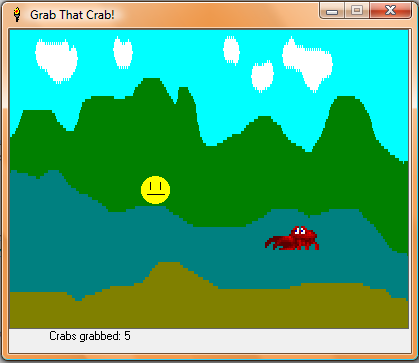 |
| Demonstration Program |
The following demonstration programs require bitmaps in your Liberty BASIC sprites folder and they must be run from the Liberty BASIC root directory.
Demo of Collision Detection Between Computer-Controlled Sprite and User-Controlled Sprite
 'Sprite Byte 7 Demo
 'Change location of user-controlled sprite when arrows are pressed
 'but do not update display, since that is done on timer.
 'Accomplish this by removing drawsprites command from
 '[updatePosition] routine.
 'Add boundary detection for user-controlled sprite.
 'Cycle crab sprite. (see lesson 3)
 'Add collision detection with spritecollides command.
 'Keep track of number of collisions with variable called hits.
 'Move enemy after collision
 'Update scoreboard after collision
 nomainwin
 loadbmp "smiley", "sprites\smiley.bmp"
 loadbmp "crab1", "sprites\crab1.bmp"
 loadbmp "crab2", "sprites\crab2.bmp"
 loadbmp "crab3", "sprites\crab3.bmp"
 loadbmp "landscape", "sprites\bg1.bmp"
 WindowHeight = 350 : WindowWidth = 408
 graphicbox #w.g, 0, 0, 400, 300
 statictext #w.s, "",40,300,100,40
 open "Grab That Crab!" for window_nf as #w
 #w "trapclose [quit]"
 #w.g "down"
 #w.g "background landscape"
 #w.g "addsprite guy smiley"
 spriteX = 10 : spriteY = 30
 #w.g "spritexy guy ";spriteX;" ";spriteY
 'set up event trapping for key presses
 #w.g "setfocus" 'MUST setfocus to graphicbox
 #w.g "when characterInput [updatePosition]"
 'add computer-controlled crab sprite
 #w.g "addsprite enemy crab1 crab2 crab3"
 'original location of crab
 crabX = 360 : crabY = 100
 'add variable for increment to move crab each time
 moveCrabX = -5 : moveCrabY = 2
 'add variable to keep track of number of collisions
 hits = 0
 #w.s "Crabs grabbed: ";hits
 'cause crab image to cycle:
 #w.g "cyclesprite enemy 1"
 #w.g "spritexy enemy ";crabX;" ";crabY
 #w.g "drawsprites" 'update screen
 'set up a timer to move crab sprite
 timer 100, [updateDisplay]
 wait
 [updatePosition]
 'change location of user-controlled sprite when arrows are pressed
 'but do not update display, since that is done on timer
 '37 = left arrow
 '38 = up arrow
 '39 = right arrow
 '40 = down arrow
 'Arrow keys make Inkey$ two characters long,
 'so we check the rightmost character with
 'the right$() function.
 'right arrow = X gets bigger:
 if asc(right$(Inkey$,1))=39 then
 'stop sprite at right edge
 if spriteX<370 then spriteX = spriteX + 3
 end if
 'left arrow = X gets smaller:
 if asc(right$(Inkey$,1))=37 then
 'stop sprite at left edge
 if spriteX>3 then spriteX = spriteX - 3
 end if
 'up arrow = Y gets smaller:
 if asc(right$(Inkey$,1))=38 then
 'stop sprite at top edge
 if spriteY>3 then spriteY = spriteY - 3
 end if
 'down arrow = Y gets bigger:
 if asc(right$(Inkey$,1))=40 then
 'stop sprite at bottom edge
 if spriteY<270 then spriteY = spriteY + 3
 end if
 #w.g "spritexy guy ";spriteX;" ";spriteY
 wait

 [updateDisplay]
 'locate sprites at new positions and update display
 'add boundary detection and reverse direction at edges
 if (crabX > 370) then moveCrabX = -5
 if (crabX < 10) then moveCrabX = 5
 if (crabY > 270) then moveCrabY = -2
 if (crabY < 10) then moveCrabY = 2
 'move computer-controlled sprite at timer intervals
 crabX = crabX + moveCrabX : crabY = crabY + moveCrabY
 #w.g "spritexy enemy ";crabX;" ";crabY
 'add collision detection
 #w.g "spritecollides guy list$"
 if instr(list$, "enemy") then
 'if collision, then increment number of hits
 hits = hits + 1
 'document on statictext scoreboard
 #w.s "Crabs grabbed: ";hits
 'move crab randomly to start chase again
 crabX=int(rnd(1)*350): crabY=int(rnd(1)*250)
 end if
 #w.g "drawsprites"
 wait
 [quit]
 timer 0
 unloadbmp "landscape"
 unloadbmp "smiley"
 unloadbmp "crab1":unloadbmp "crab2":unloadbmp "crab3"
 close #w : end
Challenges
- challenge: use word$() or a different method to detect which sprites have collided.
- challenge: add more crabs for the user to grab.
- challenge: set a time limit for the game.
- challenge: use different images to change the look of this program.