 Alyce
Mar 9, 2008
- "Slight reformatting."
Alyce
Mar 9, 2008
- "Slight reformatting."
FILES For Dummies - by alix
or how to find your way around the FILES statements without getting lost!Are you one of those programmers that gets filled with dread each time they have to make use of the FILES statement? Do you think "Oh no, not that FILES statement again!" because you know it's going to take several trials and errors runs before you get it right? All you want is to retrieve some simple information about a specific directory, and then get on with the rest of your program...
Why suffer? Here is a painless way of remembering how to use the FILES statement so that you can get the information you need about files and directories with minimum frustration.
Draw it!
Most of us understand that the FILES statement stores information in a double-dimensioned string array. FILES will also take care of adjusting the size of this array in case more space is needed. So we dutifully start our code with:dim info$(10, 10)
Now what?
That's where the trouble starts...
- First problem : Where does the all powerful FILES statement
storesstore its info? - Second Problem : How do we ask Mr. All Powerful to give us the info we need?
Note that problem 2 depends heavily on Problem 1 being solved.
This is where a simple drawing comes to the rescue.
Draw the info$() array as a table with rows and
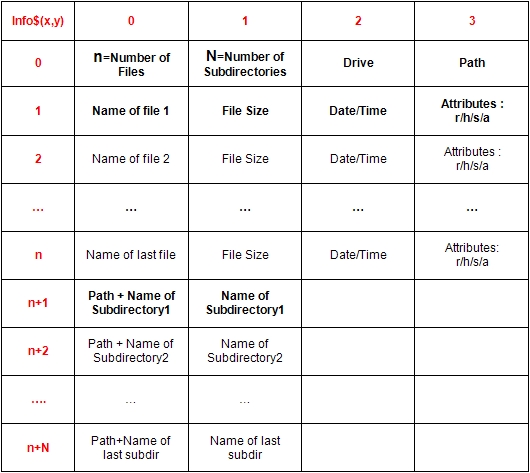 |
| The FILES table |
Et voilà! The next time you must use the FILES statement, have a look at the FILES table. Now you can quickly locate the info you need. It is as as easy as playing
- Want to know in which drive is your
folder ?folder? That's info$(0,2) - How many subdirectories are there in your
folder ?folder? That's info$(0,1) - Name the second file in your in your
folder ?folder? That's : info$(2,0)
Examples :
To finish,
How to list all the files contained in your
 dim info$(10, 10)
 myfolder$=DefaultDir$
 files myfolder$, info$()
 totfiles = val(info$(0,0))
 for i=1 to totfiles
 name$= info$(i,0)
 print "-";name$
 next
How to list all the subdirectories contained in your
 dim info$(10, 10)
 myfolder$=DefaultDir$
 files myfolder$, info$()
 totfiles = val(info$(0,0))
 totsubs = val(info$(0,1))
 for i=totfiles+1 to totfiles+totsubs
 name$= info$(i,1)
 print "-";name$
 next